Cockpit
Cockpit overview
In this manual: Cockpit
39steps
~234min
4/5difficulty
Done 0 of 39
Controls at a glance
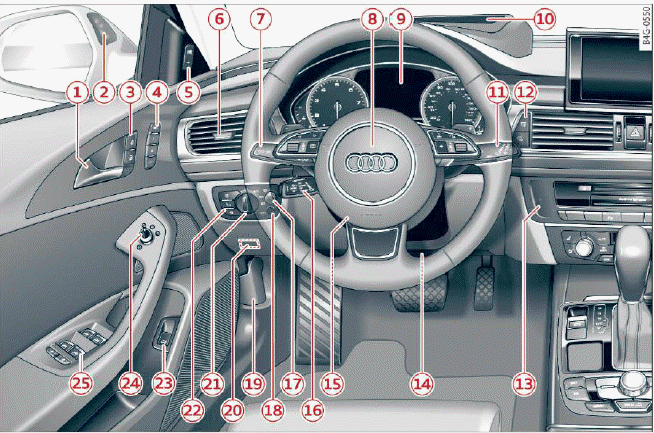
Fig. 1 Cockpit: Left section
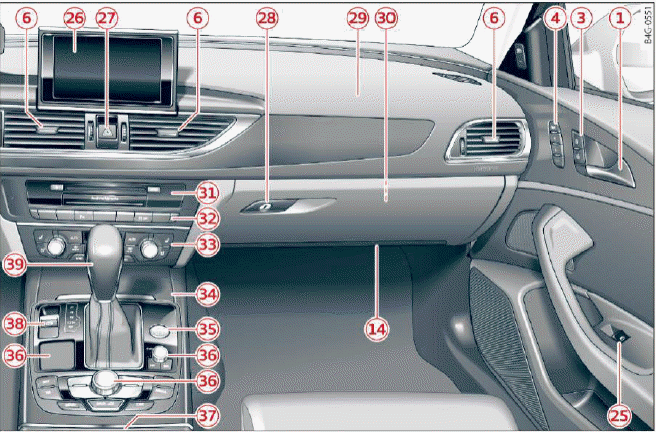
Fig. 2 Cockpit: Right section
- Door handle
- Side assist display
- Central locking switch
- Memory function buttons
- Side assist button
- Air vents with thumbwheel
- Lever for:
- Turn signals and high beams
- High beam assistant
- Active lane assist
- Multifunction steering wheel with:
- Horn
- Driver's airbag
- Driver information system controls
- Audio/video, telephone, navigation and voice recognition controls
- Steering wheel heating
- Shift paddles
- Instrument cluster
- Head-up display
- Windshield washer system lever
- Buttons for:
- Infotainment system display
- Trip odometer
- Starting the engine when there is a malfunction
- Knee airbag
- Steering wheel adjustment, depending on equipment
- Mechanical
- Power
- Lever for:
- Cruise control system
- Adaptive cruise control
- Button for switching the Head-up display on/off, adjusting the height
- Instrument illumination
- Hood release
- Data link connector for On Board Diagnostic System (OBD II)
- Light switch
- Buttons for:
- All-weather lights
- Night vision assistant
- Rear fog light(s)
- Switch for luggage compartment lid
- Power exterior mirror adjustment
- Buttons for:
- Power windows
- Parental control
- Infotainment system display
- Emergency flashers
- Glove compartment
- Front passenger's airbag
- Valet Parking function
- Drives (Infotainment system)
- Buttons/indicator light for:
- Start/Stop system
- Parking aid
- PASSENGER AIR BAG OFF
- Power sunshade
- Electronic Stabilization Control (ESC)
- Climate control system, depending on vehicle equipment:
- Deluxe automatic climate control
- 4-zone deluxe automatic climate control
- Storage compartment
- [START ENGINE STOP] button
- Infotainment unit
- Cup holder, 12 Volt outlet
- Electromechanical parking brake
- Selector lever (automatic transmission)
Tips
- Some the equipment listed here is only installed in certain models or is available as an option.
- The instrument cluster display is either multicolored or monochrome, depending on vehicle equipment. Because the images in both are nearly identical, the multicolored display is shown in this Owner's Manual.
- Operation of the Multi Media Interface (Infotainment system) is described in a separate operating instructions manual.
Was this page helpful?