Starting and driving
Unlocking/locking by remote control
In this manual: Starting and driving
~1min read
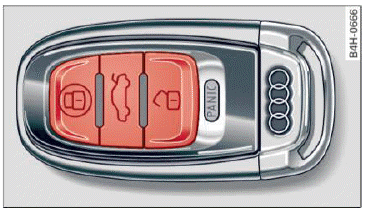
Fig. 18 Remote control key: button programming
- To unlock the vehicle, press the
 button
 fig. 18.
- To lock the vehicle, press the
 button one time
 .
- To unlock the luggage compartment lid, press the
 button briefly.
- To trigger the alarm, press the
 , button.
The vehicle horn and emergency flashers are activated.
- To turn the alarm off, press the red
 button again.
If the vehicle is unlocked and none of the doors, the rear lid or hood are opened within 60 seconds, the vehicle locks again automatically. This feature prevents the vehicle from being accidentally left unlocked over a long period of time.
The settings in the Infotainment system determine if the entire vehicle or only the driver's door is unlocked when unlocking the vehicle.
WARNING
Read and heed all WARNINGS .
Tips
- Only use the remote control key when you are within view of the vehicle.
- The vehicle can only be locked when the selector lever is in the P position.
- Do not use the remote control when you are inside the vehicle. Otherwise, you could unintentionally lock the vehicle. If you then tried to start the engine or open a door, the alarm would be triggered. If this happens, press the
 unlock button.
- Only use the panic function in an emergency.
Was this page helpful?