Rear controls
The control panel is located on the rear center console.

1 Rear left temperature
2 Automatic program
3 Display
4 Rear right temperature
5 Right rear seat heating
6 Manual air flow intensity adjustment
7 Left rear seat heating
The current temperature and air flow intensity settings are shown on display 3.
Activating the function
For principles of iDrive operation, refer to.
1. Press the button.
The main menu opens.
2. To switch to the “Climate” menu, move the controller to the left.
3. Select "Rear climate control" and press the controller.
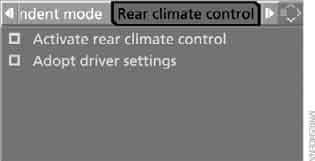
4. Select the settings and press the controller.
 Rear climate control is switched on.
If necessary, the values set for the driver's side on the front climate control can be transferred to it.
 Rear climate control does not operate when front climate control is switched off. It also does not operate if only the defrost and demist functions of the front climate control are on.◄
Automatic program
 Automatic program (AUTO) automatically adjusts the air supply and distribution to the chest and footwell areas and sets the selected temperature to suit the season.
Temperature
 Turn this control to adjust the air temperature separately for the left and right sides.
At any time of year, automatic climate control heats or cools the air to the set temperature in the shortest possible time and maintains this temperature at a constant level.
Avoid frequent temperature changes, otherwise the climate control will not have time to adjust to the selected temperature.◄
Manual fan speed control
 By pressing the corresponding edge of the button, you can manually adjust the air volume. To switch automatic air volume control back on, press the AUTO button.
Switching off the rear automatic climate control
 Holding down the left edge of the button, set the minimum fan speed. Pressing the left edge of the button again switches off the automatic climate control.
Climate control can also be switched off via iDrive. In this case, it is switched on as described in the subsection Switching on the function.◄ To switch on the system, simply press any button on its control panel.
Test yourself
A quick BMW X3 quiz: every answer comes with an explanation and a link to the manual page.