Programming
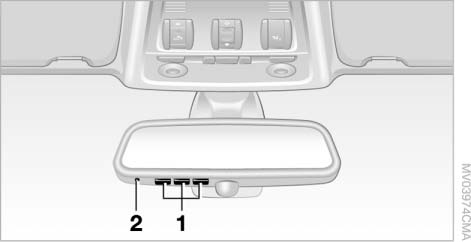
1 Memory buttons
2 LED
Fixed code remote control
1. Switch the ignition on.
2. When using for the first time, press and hold the two outer buttons 1 for about 20 seconds, until LED 2 starts flashing. All old settings are now erased.
3. Hold the original remote control 5–20 cm from buttons 1.
 The distance between the remote control and buttons 1 depends on the system controlled by this remote control.◄
4. Simultaneously press the button of the original remote control and one of buttons 1 of the built-in universal remote control.
LED 2 initially flashes slowly. When LED 2 starts flashing rapidly, release both buttons.
If LED 2 does not start flashing faster within 15 seconds, change the distance between the remote control and the buttons.
5. To program other transmitters, repeat steps 3 and 4.
The corresponding button 1 is now programmed to the signal of the original remote control.
The device can be operated with the engine running or the ignition switched on.
If the device does not respond to control commands even after reprogramming, check whether the original remote control is equipped with a rolling code system. To do this, refer to the operating instructions of the original remote control, or press and hold the programmed button 1 of the universal remote control. If LED 2 of the universal device flashes rapidly for some time and then glows continuously for two seconds, this means that the original remote control is equipped with a rolling code system. If a rolling code system is present, program memory buttons 1 as described below in the section "Rolling code remote control".◄
Rolling code remote control
To program the built-in universal remote control, you will need the operating instructions of the device you intend to control from the vehicle. Read the section on synchronization in them.
When programming a rolling-code transmitter, note the following instructions:
 Programming can be made easier if you have an assistant.◄
1. Park the vehicle within the reception range of the device's control signals.
2. Program the universal remote control as described in the section "Fixed code remote control".
3. On the receiver of the device you intend to control from the vehicle, locate the button (it is often located on the drive unit).
4. Press this button. After completing step 4, you have 30 seconds to complete step 5.
5. Press button 1 of the integrated universal remote control three times.
The corresponding button 1 is now programmed to the signal of the original remote control.
For any questions that arise, contact a BMW service center.◄
Test yourself
A quick BMW X3 quiz: every answer comes with an explanation and a link to the manual page.