Speed limit
You can set a speed limit, which the self-diagnostic system will remind you of when reached. This helps you better control speed, for example, in built-up areas.
To allow the warning to sound again, reduce the speed by 5 km/h below the set limit.
Entering, displaying and changing the value
iDrive operating principles
1. Open the main menu.
2. Open the "Navigation" menu.
On vehicles without navigation system: open the "On-board info" menu.
3. Select "On-board info" and press the controller.
4. Select "Limit" and press the controller.
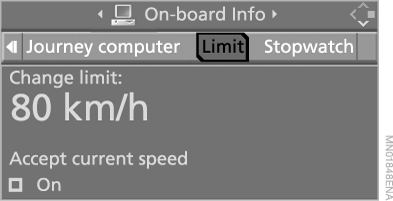
5. Depending on vehicle equipment, select "Change limit:" or set the speed value and press the controller.
6. Turn the controller to set the speed value. If the distance is large, some resistance may be felt when turning the controller.
7. Press the controller to confirm the setting.
The speed limit monitoring function is switched on automatically.
Setting the current speed as the limit
Select "Accept current speed" and press the controller.
The current speed is now set as the speed limit.
Switching on speed limit monitoring
Select "On" and press the controller.
 The entered speed becomes the limit.
Test yourself
A quick BMW X5 quiz: every answer comes with an explanation and a link to the manual page.