Park Distance Control (PDC)
Operating Principle
The PDC system assists with parking by indicating the actual distance to an obstacle in front of or behind the vehicle with audible signals and a display. The rear and front bumpers each have four ultrasonic sensors that measure the distance to the nearest object. The measuring range of the front and outer rear sensors is approx. 60 cm. The range of the center rear sensors reaches 1.2 m.
PDC is an assistance system that can warn of obstacles when approaching them slowly, as is usually the case when parking. Do not approach an obstacle too quickly, because the system has physical limits and its response may be delayed.◄
When driving with a trailer, the rear sensors are not effective and therefore are not activated.
Automatic operation
When the ignition key is in position 2, the system always becomes active automatically one second after reverse gear is engaged (manual transmission) or position R is selected (automatic transmission).
Wait this short moment before starting to drive.
After approx. 50 m or when accelerating above 30 km/h, the system switches off automatically and the LED goes out. When necessary, switch the system on again.
Manual activation

Press the button. The LED lights up.
Manual deactivation
Press the button again. The LED goes out.
Horn
The distance to an obstacle is indicated by an intermittent audible signal from the corresponding speaker.
If the system detects an obstacle, for example at the rear left, the signal sounds from the rear left speaker. As you get closer to the obstacle, the intervals become shorter. At a distance of less than 30 cm, the signal becomes continuous.
If you are moving parallel to a wall, the signals stop after 3 seconds.
Malfunctions
The LED in the button flashes and a message appears on the control display: PDC malfunction. Have the system checked at a BMW service center.
To ensure correct system operation, keep the sensors clean.
PDC with distance display
The change in distance to an obstacle can be observed on the control display. Distant obstacles are shown on the control display before an audible signal sounds.
iDrive operating principles
1. Open the home screen.
2. Press the controller to go to the menu .
3. Select “Vehicle settings” and press the controller.
4. Select “PDC” and press the controller.
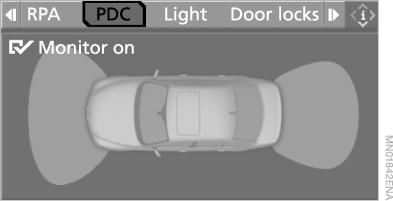
5. Select “Monitor on” and press the controller.
 PDC display is switched on.
The image appears on the control display after the PDC system is switched on.
This setting is stored in the memory for the key currently in use.
Physical limits of system operation
PDC cannot fully replace the driver. Only the driver can accurately assess the nature of an obstacle. The sensors have a “blind spot” in which they cannot detect objects. In addition, the reliability of ultrasonic measurement is also limited; for example, a trailer drawbar or towing hitch, as well as thin or wedge-shaped objects, may give distorted results. Low obstacles (for example a curb edge) may enter the sensors’ blind spot before a continuous signal sounds.
Raised obstacles located high up (for example eaves) may also go undetected. Keep in mind that loud sound inside or outside the vehicle may drown out the PDC warning signals.◄
 To keep the sensors functioning, clean them of dirt and ice.
When cleaning with high-pressure washing equipment, make sure the jet does not remain on the PDC sensors. Maintain a distance of at least 10 cm.◄
Test yourself
A quick BMW X5 quiz: every answer comes with an explanation and a link to the manual page.