Entertainment systems
Listening to stations briefly: scanning
In this manual: Entertainment systems
~1min read
Automatic scan lets you listen to short samples of radio stations in the selected band, one after another.
1. Select "FM" or "AM" and press the controller.
"Set" is selected.
2. Press the controller.
The following menu items appear on the screen.
3. Select "Scan" and press the controller.
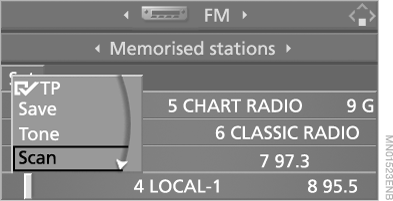
Scanning starts.
Stopping the scan:
1. Press the controller.
2. Select "Scan" and press the controller.
Automatic scanning stops and the selected radio station continues to play.
Buttons on the CD player
 To start scanning, press and hold the button in the desired direction for a while.
To stop the scan, press and release the button again.
Test yourself
A quick BMW X5 quiz: every answer comes with an explanation and a link to the manual page.
Was this page helpful?