Steering Wheel Controls
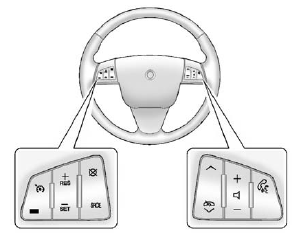
Some audio steering wheel controls could differ depending on the vehicle's options.
Controls that can be adjusted at the steering wheel may include:
SRCE: Press to switch between AM, FM, or XM (if equipped) radio, CD, HDD (if equipped), auxiliary input jack, DVD (if equipped), and USB (if equipped).
 or
 : Press to go to the previous or next radio station stored as a favorite, or the previous or next track of a CD.
Press to interact with the Bluetooth® system. See Bluetooth for more information.
 : Press to increase or to decrease the volume.
 : Press and release to silence the vehicle speakers only.
The audio of the wireless and wired headphones, if the vehicle has these features, does not mute.
Press and release again, to turn the sound on.
- For vehicles with a navigation system, press and hold for two seconds to initiate speech recognition.
- For vehicles without a navigation system, press and hold for two seconds to interact with OnStar® or Bluetooth.
- For vehicles with a navigation system, OnStar, or Bluetooth, press and hold for two seconds and say “hands free” to interact with OnStar or Bluetooth.
For more information, see Steering Wheel Controls.
Test yourself
A quick Cadillac CTS quiz: every answer comes with an explanation and a link to the manual page.