Storage
Cargo Cover (Wagon)
In this manual: Storage
~1min read
The cargo cover can be used to cover items in the cargo area.
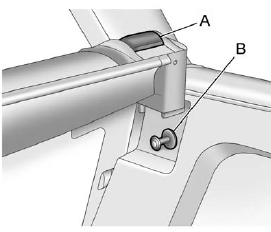
To install the cargo cover:
1. Hold the cartridge with the pull-out shade toward the rear of the vehicle.
2. Align the cartridge over the pin (B) on both sides. Press the cartridge down and turn it slightly forward until it clicks.
3. The cartridge is properly installed if it fits firmly when pulled and pushed.
4. Grasp the handle and unroll the cover. Latch the posts into the sockets.
To remove the cargo cover:
1. Release the cover from the latch posts and carefully roll it back up.
2. Pull the handle (A) back and remove it from the pin (B) on the trim panel. Repeat this on the other side.
Test yourself
A quick Cadillac CTS quiz: every answer comes with an explanation and a link to the manual page.
Was this page helpful?