Cargo Net
For vehicles equipped with a cargo net, it can be used to store light loads, keeping them from falling over or being thrown into the cabin during heavy braking.
The net should not be overloaded or used to store heavy loads.
There are four openings in the headliner: two located behind the front seats and two behind the rear seats.

1. Insert the top corners of the cargo net into the large opening in the headliner and secure by sliding them into the small opening.
2. The rear seatbacks should be folded down when the net is installed in the headliner opening located behind the front seats.
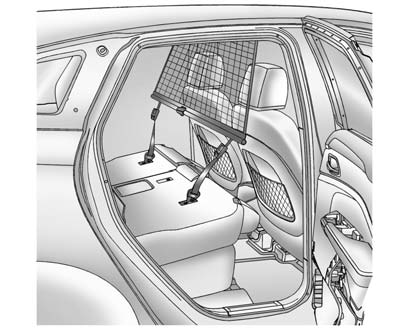
3. Mount the cargo net to the rear seat tethers located on the back of the folded down rear seats and pull on the straps to tighten the net.
4. When the net is installed in the headliner opening located behind the rear seats, the rear seatbacks should be upright.
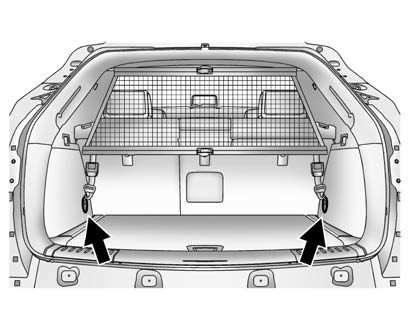
5. Mount the cargo net to the cargo tie-downs located on the lower side panels.
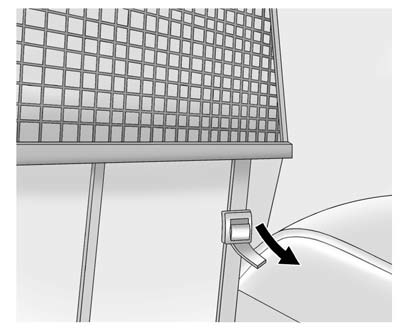
6. Pull on the straps to tighten the net.
Cargo Net Storage
The cargo net can be removed from the vehicle and stored in the cargo management system.
1. Disconnect the net from the roof openings and the tethers.
2. Press the red button on the center of the net to fold it in half.
3. Roll up the cargo net, storing it into the attached vinyl bag.
4. Open the cargo management system cover.
5. For vehicles with an inflator kit, store the cargo net in the available space next to the kit.
Test yourself
A quick Cadillac SRX quiz: every answer comes with an explanation and a link to the manual page.