Instruments and Controls
DIC Buttons
In this manual: Instruments and Controls
~1min read
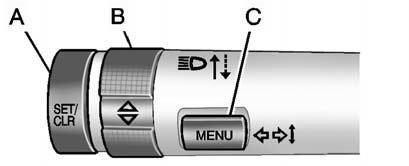
A. SET/CLR (Set/Clear): Use this button to set or clear the menu item when it is displayed.
B.  (Thumbwheel): Use the thumbwheel to scroll through the items in each menu.
A small marker will move up or down the side of the display as you scroll through the items.
This shows where each item is in the menu.
C. MENU: Press this button to get to the Trip/Fuel Information Menu and the Vehicle Information Menu.
Test yourself
A quick Cadillac SRX quiz: every answer comes with an explanation and a link to the manual page.
Was this page helpful?