Chevrolet Cruze Owners Manual
Driver Information Center (DIC)
In this manual: Chevrolet Cruze Owners Manual
~1min read
The DIC display is in the center of the instrument cluster. It shows the status of many vehicle systems. The controls for the DIC are on the turn signal lever.
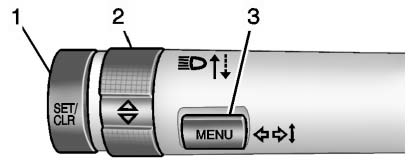
1. SET/CLR: Press to set, or press and hold to clear, the menu item displayed.
2.  /
 : Use the thumbwheel to scroll through the items in each menu.
3. MENU: Press to display the DIC menus. This button is also used to return to or exit the last screen displayed on the DIC.
Test yourself
A quick Chevrolet Cruze quiz: every answer comes with an explanation and a link to the manual page.
Was this page helpful?