Chevrolet Cruze Owners Manual
Overview
In this manual: Chevrolet Cruze Owners Manual
~1min read
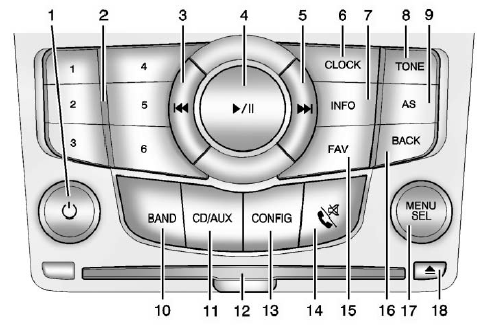
 • Turns the system on or off and adjusts the volume. 2. Buttons 1 to 6
• Radio: Saves and selects favorite stations. 3.
 • Radio: Seeks the previous station. • CD: Selects the previous track or rewinds within a track. 4.
 • CD: Pauses playback, and stops playback. 5.
 • Radio: Seeks the next station. • CD: Selects the next track or fast forwards within a track. 6. CLOCK
• Opens the clock menu. 7. INFO
• Radio: Shows available information about the current station. • CD: Shows available information about the current track. 8. TONE
• Opens the tone menu. 9. AS
• Radio: Opens the autostore stations list. 10. BAND
• Changes the band while listening to the radio. • Selects the radio when listening to a different audio source. 11. CD/AUX
• Selects the CD player or an external audio source. 12. CD Slot
• Insert a CD. 13. CONFIG
• Opens the settings menu. 14.
 • Opens the phone main menu. • Mutes the audio system. 15. FAV
• Radio: Opens the favorites list. 16. BACK
• Menu: Moves one level back. • Character Input: Deletes the last character. 17. MENU/SEL
• Turn to open menus, highlight menu items, or set numeric values while in a menu. • Press to select menu items. • Radio: Manually selects radio stations. • CD: Selects tracks.
18.  • Removes a disc from the CD slot.
Test yourself
A quick Chevrolet Cruze quiz: every answer comes with an explanation and a link to the manual page.
Was this page helpful?