Quick Info
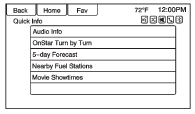
Quick Info gives access to quick information on Audio playing, OnStar Turn-by-Turn route (if equipped), 5-day forecast, Nearby Fuel Stations, and Movie Show Times.
To access, press Quick Info on the Home Page or the INFO button on the faceplate. Depending on the system and if the options are available for that region, some options may be grayed out.
Audio Info: Displays information on current item playing.
OnStar Turn-by-Turn:Displays the next maneuver in a route. See OnStar® Destination Download on page 61.
5-day Forecast:Displays the 5-day forecast for the weather station closest to the current location. See “Weather (If Equipped)” in Satellite Radio on page 18.
Nearby Fuel Stations:Displays fuel prices and distances for close fuel stations.
Movie Showtimes:Displays a list of movies playing in the theaters closest to current location.
Test yourself
A quick Chevrolet Cruze quiz: every answer comes with an explanation and a link to the manual page.