Steering Wheel Controls
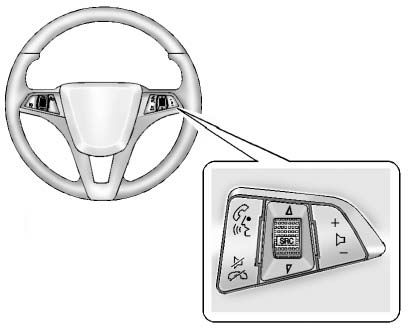
For vehicles with audio steering wheel controls, some audio controls can be adjusted at the steering wheel.
 (Push to Talk): For vehicles with a Bluetooth, OnStar, or navigation system, press to interact with those systems.
 (Mute/End Call): Press to silence the vehicle speakers only.
Press again to turn the sound on.
For vehicles with OnStar or Bluetooth systems, press to reject an incoming call, or end a current call.
 SRC
 (Source/Favorite): Press to select a source or turn to change favorite stations.
Press  or
 to select AM, FM, CD, or MP3 track.
Turn  or
 to select the next or previous saved favorite radio stations.
+  − (Volume): Press + to increase the volume. Press − to decrease the volume.
Test yourself
A quick Chevrolet Cruze quiz: every answer comes with an explanation and a link to the manual page.