Home Page (Radio with Touchscreen)
Touchscreen Buttons
Touchscreen buttons show on the screen when available. When a function is unavailable, the button may gray out. When a function is selected, the button may highlight.
Home Page Features
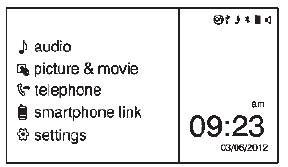
Press  to go to the Home Page.
 audio: Press to select AM, FM, SiriusXM®
(if equipped), USB/iPod/ Bluetooth Audio, or AUX.
 picture & movie: Press to view a
picture, movie, or auxiliary video.
 telephone: Press to activate the
phone features (if equipped).
See Bluetooth (Overview) on page 7-19 or Bluetooth (Infotainment Controls) on page 7-21.
 smartphone link: Press to listen
to Pandora® (if equipped), Stitcher®, or available application. See Smartphone Link (Overview) on page 7-29 or Smartphone Link (Pandora) on page 7-31 or Smartphone Link (Stitcher) on page 7-33.
 settings: Press to access the Personalization
menu. See Vehicle Personalization on page 5-27.
Test yourself
A quick Chevrolet Spark quiz: every answer comes with an explanation and a link to the manual page.