Multifunction displays
Menu
In this manual: Multifunction displays
~1min read

Once this menu is selected, you can view information on the vehicle status (alert log, function status...).
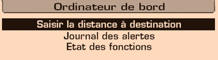
Alert log
It lists the active alert messages, displaying them one after another on the multifunction display.
Function status
It lists the active or inactive status of the functions fitted to the vehicle.
Enter the distance to destination
This lets you enter an approximate distance to the final destination.
- Press the “MENU” button to access the main menu.
- Press the arrows, then the “OK” button to select the “Trip computer” menu.
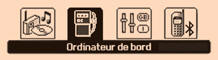
- In the “Trip computer” menu, select one of the following applications:
Test yourself
A quick Citroen C1 quiz: every answer comes with an explanation and a link to the manual page.
Was this page helpful?