Instruments and controls
Clock
In this manual: Instruments and controls
~1min read
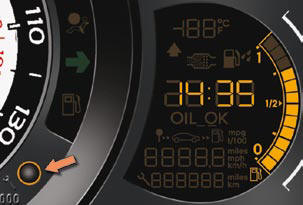
Adjusting the time - Choice of units
To adjust the time of the clock and choose the units used by the screen, use the right-hand button on the instrument panel, carrying out the operations in the following order:
- press the button for more than two seconds: the minutes fl ash,
- press the button to increase the minutes,
- press the button for more than two seconds: the hours fl ash,
- press the button to increase the hours,
- press the button for more than two seconds: 24 H or 12 H is displayed,
- press the button to select 24 H or 12 H,
- press the button for more than two seconds: °C or °F is displayed,
- press the button to select °C or °F,
- press the button for more than two seconds to complete the adjustments.
After approximately 30 seconds without any action, the screen returns to the normal display.
Test yourself
A quick Citroen DS3 quiz: every answer comes with an explanation and a link to the manual page.
Was this page helpful?