Multifunction screens
Controls
In this manual: Multifunction screens
~1min read
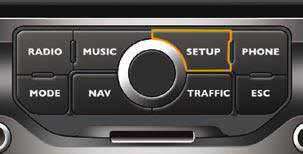
MyWay To select one of the applications, at the control panel:
- press the dedicated "RADIO" , "MUSIC" , "NAV" , "TRAFFIC" , "SETUP" or "PHONE" button for access to the corresponding menu,
- turn the dial to move the selection,
- press the dial to confi rm the selection, or
- press the "ESC" button to abandon the current operation and return to the previous display.
For further information on these applications, refer to the "Audio and Telematics" section or to the specifi c user guide given to you with the other owner's documents.
Test yourself
A quick Citroen DS3 quiz: every answer comes with an explanation and a link to the manual page.
Was this page helpful?