Access to menu screen
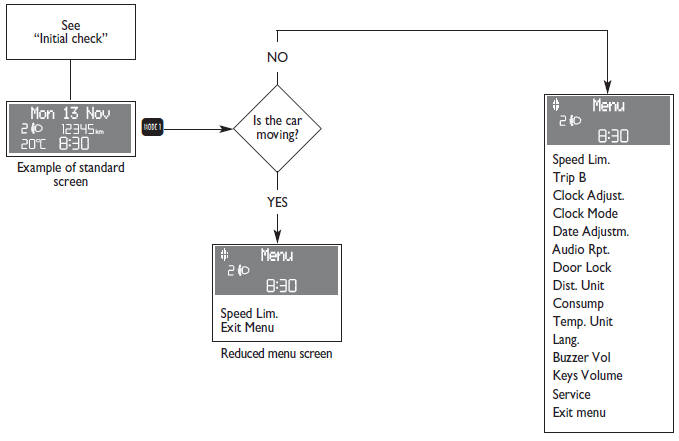
After the “Initial check”, it is possible to access the menu screen pressing the button  .
To surf the menu press buttons + or –.
IMPORTANT If after entering the menu no setting/adjustment is performed within 60 seconds, the system exits the menu automatically and returns to previously displayed screen. In this case the last selected but not confirmed setting (through button  ) is not stored and therefore the operation shall be repeated (this stands valid also when quitting the Menu by pressing the
 button).
When the car is running, it is possible to access only the reduced menu (for setting “Speed limit”). When the car is stationary access to the whole menu is enabled.
The following diagram shows the cases described.
Test yourself
A quick Fiat Punto quiz: every answer comes with an explanation and a link to the manual page.