Electrical system
Clocks - setting
In this manual: Electrical system
~1min read
Quartz type
1 To set the hands, depress the knob and turn it. Digital type
2 To set the clock, depress button A to display minutes and seconds and again to display hours and minutes. 3 To correct the hour setting, press button C then button A and release it at the correct time. Depress button C three times to display hours and minutes. 4 To correct the minute setting, depress button C twice. Depress button A and release it when the correct time is shown. Depress button C twice to display hours and minutes. 5 To correct the second setting, depress button C three times. Depress button A and hold it depressed to zero the seconds then release the button. Depress button C to display the hours and minutes.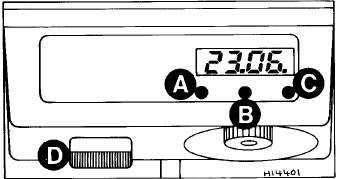
Fig. 9.16 Digital clock controls (Sec 35)
1 To set the hands, depress the knob and turn it. Digital type
2 To set the clock, depress button A to display minutes and seconds and again to display hours and minutes. 3 To correct the hour setting, press button C then button A and release it at the correct time. Depress button C three times to display hours and minutes. 4 To correct the minute setting, depress button C twice. Depress button A and release it when the correct time is shown. Depress button C twice to display hours and minutes. 5 To correct the second setting, depress button C three times. Depress button A and hold it depressed to zero the seconds then release the button. Depress button C to display the hours and minutes.
6 Switch D, Fig. 9.16 operates the map reading lamp fitted to SX models in conjunction with the digital clock.
Fig. 9.16 Digital clock controls (Sec 35)
A Control button - hour setting B Control button - display (ignition off) C Control button - minute setting D Map reading lamp switch
Test yourself
A quick Fiat Uno quiz: every answer comes with an explanation and a link to the manual page.
Was this page helpful?