Accessories
Multifunction Display
In this manual: Accessories
5steps
~30min
2/5difficulty
Done 0 of 5
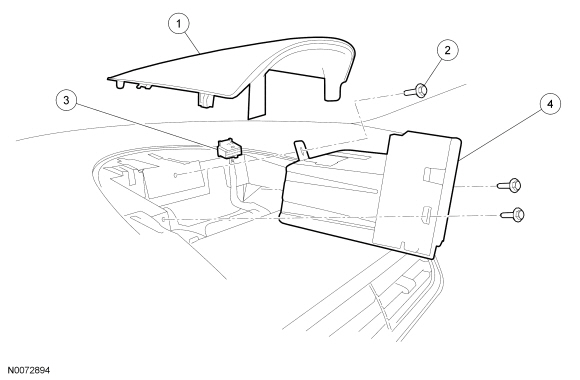
| Item | Part Number | Description |
|---|---|---|
| 1 | 7804302 | Instrument panel upper finish panel |
| 2 | W710147-S | Front Display Interface Module (FDIM) screws (3 required) |
| 3 | — | FDIM electrical connector (part of 14401) |
| 4 | 14D008 | FDIM |
Removal and Installation
- NOTE: Module configuration is only required if a new Front Display Interface Module (FDIM) is being installed.
Upload the FDIM configuration information to the scan tool. For additional information, refer to Programmable Module Installation (PMI) in Section 418-01.
- Remove the instrument panel upper finish panel by pulling straight up.
- Remove the 3 FDIM screws.
- Remove the FDIM .
- Disconnect the electrical connector.
- To install, reverse the removal procedure.
- Download the configuration information to the FDIM . For additional information, refer to PMI in Section 418-01.
Test yourself
A quick Ford Focus quiz: every answer comes with an explanation and a link to the manual page.
Was this page helpful?