Chassis
Stability Control Sensor Cluster
In this manual: Chassis
6steps
~36min
2/5difficulty
Done 0 of 6
Special Tool(s)
Removal and Installation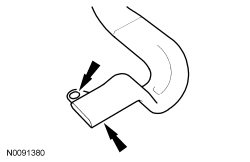
 |
Vehicle Communication Module (VCM) and Integrated Diagnostic System (IDS) software with appropriate hardware, or equivalent scan tool |
| Item | Part Number | Description |
|---|---|---|
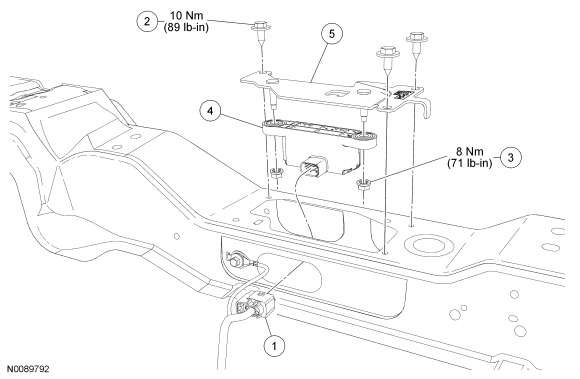
| 1 | 2C011 | Stability control sensor cluster electrical connector |
| 2 | W500011 | Stability control sensor cluster bracket bolt (3 required) |
| 3 | W707142 | Stability control sensor cluster nut (2 required) |
| 4 | 3C187 | Stability control sensor cluster |
| 5 | 2C304 | Stability control sensor cluster bracket |
Removal and Installation
- Remove the RH front seat. For additional information, refer to Seat — Front in Section 501-10.
- Remove the pin-type retainer and position the RH rear footwell duct aside.
- Remove the 3 stability control sensor cluster bolts and position the sensor cluster to access the electrical connector.
- To install, tighten to 10 N·m.
- Disconnect the electrical connector and remove the sensor cluster assembly.
- Remove the 2 stability control sensor cluster nuts and the stability control sensor cluster.
- To install, tighten to 8 N·m.
- To install, reverse the removal procedure.
- Carry out the IVD Initialization sequence. Follow the scan tool directions.
Test yourself
A quick Ford Focus quiz: every answer comes with an explanation and a link to the manual page.
Was this page helpful?