Telephone setup
After start up access to the phonebook list can be delayed for several minutes, depending upon the size.
Phonebook categoriesDepending on your phonebook entry, different categories can be displayed in the audio unit.
For example:
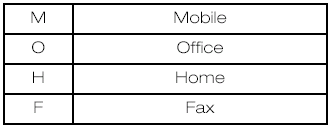
Note: Entries may be displayed without a category attachment.
The category can also be indicated as an icon:


When using the system for the first time, no phone is connected to the system.
After switching on the ignition and the audio unit, the Bluetooth phone must be bonded to the system.
Bluetooth phoneAfter bonding a Bluetooth phone to the system, this becomes the active phone.
For further information refer to the phone menu.
Select the phone from the active phone menu.
Turning the ignition and radio or navigation unit back on again, the last active phone is picked up by the system.
Note: In some cases the Bluetooth connection must also be confirmed on the phone. Bond another Bluetooth phoneBond a new Bluetooth phone as described in the requirements for a Bluetooth connection.
Phones stored in the system are accessible by using the phone list on the audio unit.
Note: A maximum of six devices may be bonded. If six Bluetooth devices have already been bonded, one of these has to be debonded in order to bond a new device.Test yourself
A quick Ford Focus quiz: every answer comes with an explanation and a link to the manual page.