Auxiliary input jack
Make sure you are aware of all applicable local laws that may affect the use of electronic devices while driving.
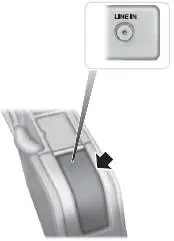
The auxiliary input jack allows you to connect and play music from your portable music player through your vehicle speakers. You can use any portable music player designed for use with headphones. Your audio extension cable must have male 1⁄8-inch (3.5 millimeter) connectors at each end.
There is a notch on the side of the console as indicated. To prevent the console lid from crushing the cable, route the cable through the notch.
1. Switch off the engine, radio and portable music player. Set the parking brake and put the transmission in position P (vehicle with an automatic transmission) or neutral (vehicle with a manual transmission).
2. Plug the extension cable from the portable music player into the auxiliary input jack.
3. Switch the radio on. Select either a tuned FM station or a CD.
4. Adjust the volume as desired.
5. Switch your portable music player on and adjust its volume to half its maximum level.
6. Press AUX until LINE or LINE IN appears in the display. You should hear music from your device even if it is low.
7. Adjust the volume on your portable music player until it reaches the volume level of the FM station or CD. Do this by switching back and forth between the AUX and FM or CD controls.
Test yourself
A quick Ford Mustang quiz: every answer comes with an explanation and a link to the manual page.