Car2U® home automation system
See Erasing the Function Button Codes later in this section.
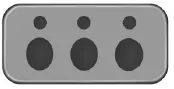
The universal garage door opener replaces the common hand-held garage door opener with a three-button transmitter that is integrated into the driver’s sun visor.
The system includes two primary features, a garage door opener and a platform for remote activation of devices with the home. As well as being programmed for garage doors, the system transmitter can be programmed to operate security devices and home lighting systems.
Additional system information can be found on-line at www.learcar2U.com or by calling the toll-free help line 1-866-572-2728.
Rolling Code Programming
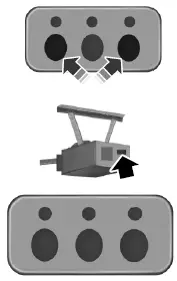
1. Switch the ignition on.
2. Press and hold the outer two buttons for 1–2 seconds, then release.
3. Press the learn button on the garage door opener motor.
4. Return to your car.
5. Press and hold the function button you would like to use to control the garage door. You may need to hold the button from 5–20 seconds, during which time the selected button LED lamp will flash slowly.
6. When the garage door moves, release the button within one second.
The LED lamp will flash rapidly until programming is complete.
7. Press and release the button again. The garage door should move, confirming that programming is successful. If your garage door does not operate, repeat the previous steps.
The LED lamp above the selected button will illuminate to confirm that the system is responding to the button command.
To program another rolling code device, repeat Step
Fixed Code Programming
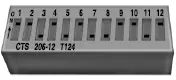
To program units with fixed code DIP switches, you will need the garage door hand-held transmitter, paper and a pen or pencil.
1. Switch the ignition on.
< 2. Open the battery cover and note all the switch settings from left to right.
When the switch is in the up, on, or + position, mark down “left button”.
When the switch is in the middle, neutral, or 0 position, mark down “middle button”.
When the switch is in the down, off, or – position, mark down “right button”.
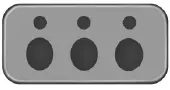
3. Press all three function buttons simultaneously for a few seconds and then release. The LED lamps will flash slowly.
4. Enter the corresponding DIP switch settings from left to right into the system by pressing and releasing the buttons corresponding to the settings you noted.
5. Simultaneously press and release all three function buttons. The LED lamps will illuminate.
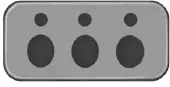
6. Press and hold the function button you would like to use to control the garage door.
7. When the garage door moves, release the button within one second.
When the button is released, the LED lamp will flash slowly.
8. The LED lamp will begin to flash rapidly until programming is complete. If your garage door does not operate, repeat the previous steps. Otherwise, call the toll-free help line at 1-866-572-2728.
The LED lamp above the selected button will illuminate to confirm that the system is responding to the button command.
Erasing the Function Button Codes
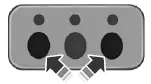
1. Press and hold the outer two function buttons simultaneously for approximately 20 seconds until the LED lamps above the buttons flash rapidly.
2. When the LED lamps flash, release the buttons. The codes for all buttons are erased.
FCC and RSS-210 Industry Canada Compliance
This device complies with Part 15 of the FCC Rules and with RSS-210 of Industry Canada. Operation is subject to the following two conditions: (1) this device may not cause harmful interference, and (2) this device must accept any interference received, including interference that may cause undesired operation.
Changes or modifications to your device not expressly approved by the party responsible for compliance can void the user’s authority to operate the equipment.
Test yourself
A quick Ford Mustang quiz: every answer comes with an explanation and a link to the manual page.