Information
Under the Information menu, you can access features such as Where Am I? and Sirius Travel Link, view your calendar, see system information and get basic system help.
Press the I (Information) hard button to access these features.
Where Am I?
Press the I button and select the Where Am I? tab. The system gives you your current GPS location (latitude and longitude), the current street you are on as well as the street in front and behind your vehicle position along with distance information.
Check with an authorized dealer for availability.
Sirius® Travel Link™
Make sure you are aware of all applicable local laws that may affect the use of electronic devices while driving.
Go to www.siriusxm.com/travellink for more information.
Sirius Travel Link can help you locate the best gas prices, find movie listings, get current traffic alerts, access the current weather map, get accurate ski conditions and scores to current sports games.

Press the I (information) button, then select Sirius Travel Link.
Choose from any of the following services:
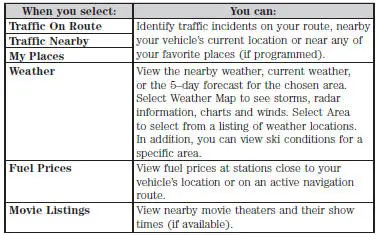
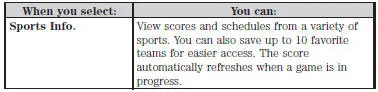
Sirius Travel Link Voice Commands

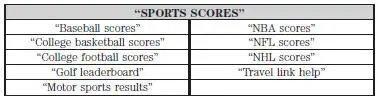
Press the voice button and, after the tone, say “Travel Link”, then any of the commands in the following chart:
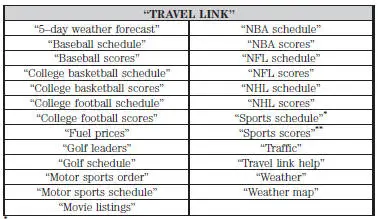
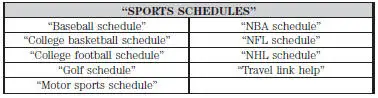
*If you have said, “Sports schedule”, you may say any of the commands in the “Sports schedule” chart:
**If you have said, “Sports scores”, you may say any of the commands in the “Sports scores” chart:
Calendar

Press the I (information) button, then select Calendar. You can then select which month you would like to view by using the arrow buttons or selecting Go to Today.
You can view calendars from one previous year and the next 10 years.
Note: Not all tab selections may be available in all markets. Check with an authorized dealer for availability.
System Information

Press the I (information) button, then select System Information.
In this screen, you can view the following options:
• Phone number for your Customer Service Center
• Current system versions installed
• Current Sirius Radio ESN
• Sirius Travel Link ESN.
Help
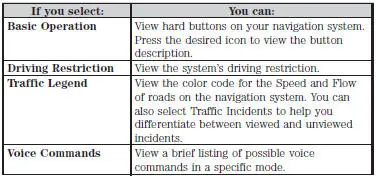
The Help screen allows you to view basic information about controls and driving restrictions as well as traffic legend information and basic voice commands available in various modes.
Test yourself
A quick Ford Mustang quiz: every answer comes with an explanation and a link to the manual page.