Memory function
The memory control, located on the side seat panel, allows positioning recall of the: • Driver seat.
• Power mirrors.
• Adjustable pedals (if equipped).
• Power tilt/telescopic steering column (if equipped).
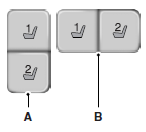
A. Type 1
B. Type 2
Programming a memory positionNote: You can program a memory position at any time.
• To program a position, move the memory features to the desired positions using the associated controls. Press and hold the desired memory button for at least two seconds. A chime will sound confirming that a memory position has been set.
• To program another position, repeat the previous procedure using the other buttons.
Recalling a memory positionYou can recall a programmed memory position: • In any gearshift position if the ignition is not on.
• Only in park (P) or neutral (N) if the ignition is on.
Press the desired memory control to recall a memory position.
Recalling a memory position with the remote controlThe memory positions are also recalled when you press unlock on your remote control (if the transmitter is programmed to a memory position) or, when you enter a valid personal entry code that is programmed to a memory position. If you enable the easy entry feature, the seat will first
move to the easy entry position. The seat will move to the final position when the key is in the ignition or when the push button start system is put in accessory mode or started.
To program the memory feature to a remote control, see the Keys and remote control chapter.
Easy Entry and Exit Feature (If Equipped)This feature can move the seat rearward and the optional steering column up and forward to allow extra room to exit the vehicle.
This occurs when: • You place the transmission in neutral (N) or park (P), and • You turn the ignition off.
The seat and steering wheel will move to their original positions when: • You place the transmission in neutral (N) or park (P), and • You turn the ignition on.
Turn the Easy Entry/Exit feature on or off through the information display settings menu. See the Information Displays chapter.
Test yourself
A quick Ford Taurus quiz: every answer comes with an explanation and a link to the manual page.