Using cruise control
Do not use cruise control in heavy traffic, on winding roads or when the road surface is slippery. This could result in loss of vehicle control, serious injury or death.
WARNING:When you are going downhill, your vehicle speed may increase above the set speed. The system will not apply the brakes. Change down a gear to assist the system in maintaining the set speed. Failure to do so could result in loss of vehicle control, serious injury or death.
Note: Cruise control will disengage if your vehicle speed decreases more than 16 km/h below your set speed while driving uphill.
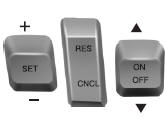
The cruise controls are located on the steering wheel.
Switching Cruise Control OnPress the ON control up and release.

The indicator will appear in the instrument cluster.
Setting a Speed1. Accelerate to the desired speed.
2. Press the SET control upward and release.
3. Take your foot off the accelerator pedal.
The indicator will change colors in the instrument cluster.
Changing the Set SpeedNote: If you accelerate by pressing the accelerator pedal, the set speed will not change. When you release the accelerator pedal, you will return to the speed that you previously set.
• Press SET up or down and hold to increase or decrease the set speed.
Release the control when you reach the desired speed.
• Press SET up or down and release. The set speed will change in approximately 2 km/h increments.
• Press the accelerator pedal or brake pedal until you reach the desired speed. Press SET up and release.
Canceling the Set SpeedPress CNCL or tap the brake pedal. The set speed will not be erased.
Resuming the Set SpeedPress and release RES.
Switching Cruise Control OffNote: The set speed is erased when you switch off cruise control.
Press the OFF control down and release or turn off the ignition.
Test yourself
A quick Ford Taurus quiz: every answer comes with an explanation and a link to the manual page.