Truck-Camper Loading Information
A vehicle-specific Truck-Camper Loading Information label is attached to the inside of the vehicle's glove box. This label indicates if a slide-in camper can be carried, how much of a load the vehicle can carry, and how to correctly spread out the load. It will help to match the right slide in camper to the vehicle.
Your dealer can help make a good vehicle-camper match and help determine the Cargo Weight Rating (CWR).
When installing and loading a slide-in camper, check the manufacturer's instructions.
When carrying a slide-in camper, the total cargo load of the vehicle is the weight of the camper, plus the following:
• Everything added to the camper after it left the factory
• Everything in the camper
• All the people inside
The CWR is the maximum weight of the load the vehicle can carry. It does not include the weight of the people inside. But, use about 68 kg (150 lbs) for each seat.
The total cargo load must not be more than the vehicle's CWR.
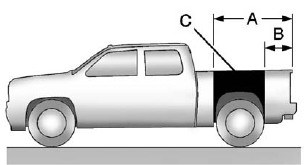
Refer to the Truck-Camper Loading Information label in the glove box for dimensions A and B as shown in the following illustration.
Test yourself
A quick GMC Sierra quiz: every answer comes with an explanation and a link to the manual page.