Memory Features
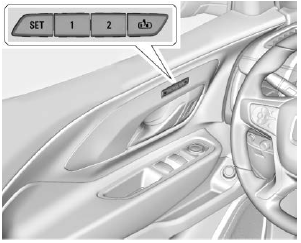
If equipped with memory seats, up to two drivers can store and recall their unique driving seat positions and a common exit position for exiting the vehicle. Other functional positions can also be stored, such as power mirrors and a power tilt/telescope steering wheel, if equipped. Memory positions are linked to RKE transmitter 1 or 2 for automatic memory recall.
Before storing, adjust all available memory function positions. Turn the ignition on, then press and release SET; a tone will sound. Then immediately press and hold 1, 2, or (Exit) until two tones sound. To manually recall these positions, press and hold 1, 2, or
 until the stored position is reached.
When the entry memory feature is enabled in Vehicle Personalization, the positions previously stored to memory buttons 1 and 2 are recalled when the ignition is changed from OFF to ON or ACC/ACCESSORY.
When seat exit memory is enabled in Vehicle Personalization, the feature automatically recalls the previously stored exit position when exiting the vehicle.
Memory settings may not be available at delivery or after service until the steps in the "Storing Memory Positions" section have been completed. See Memory Seats.
Test yourself
A quick GMC Terrain quiz: every answer comes with an explanation and a link to the manual page.