Power Windows
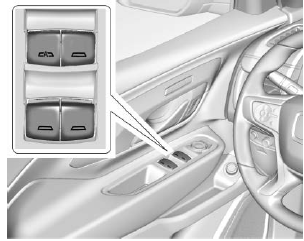
The power windows operate when the ignition is on, in ACC/ACCESSORY, or during Retained Accessory Power (RAP). Refer to Retained Accessory Power (RAP).
Using the window switch, press to open or pull to close the window.
Windows may be temporarily disabled if they are used repeatedly within a short time.
Window Lockout

This feature stops the rear passenger window switches from operating.
Press Press to activate the rear window lockout feature. The indicator light comes on when activated. Press
 again to deactivate.
One-Touch Window Operation
All windows can be opened without holding the window switch. Press the switch down fully and release quickly to express open the window.
If equipped, pull the window switch fully and release quickly to express close the window.
Briefly press or pull the window switch in the same direction to stop the express operation of that window.
Window Automatic Reverse System
The express close feature will reverse the window if it contacts an object. Strong cold or ice may cause the window to automatically reverse. The window will operate normally after the object or condition is removed.
Automatic Reverse System Override
With the engine running, override the automatic reverse system by pulling and holding the window switch if conditions prevent it from closing.
Power Window Programming
Programming may be required if the vehicle battery was disconnected or discharged. If the window does not close, program each express close window:
- Close all doors.
- Turn the ignition on or set to ACC/ACCESSORY.
- Partially open the window to be programmed. Then close it and continue to pull the switch briefly after the window is fully closed.
- Open the window and continue to briefly press the switch after the window is fully open.
Remote Window Control
If equipped, this feature allows all windows to be opened remotely. If enabled in vehicle personalization, press and hold on the RKE transmitter. Refer to Vehicle Personalization.
Test yourself
A quick GMC Terrain quiz: every answer comes with an explanation and a link to the manual page.