Accessories
ECON Switch Removal and Installation ('13-'14)

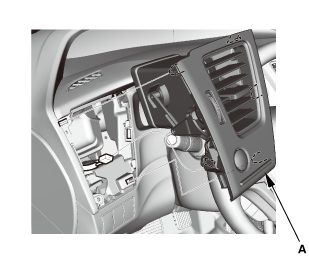
- Driver's Outer Vent
 |
|
1. |
Remove the driver's outer vent (A). |
|
 |
|
2. |
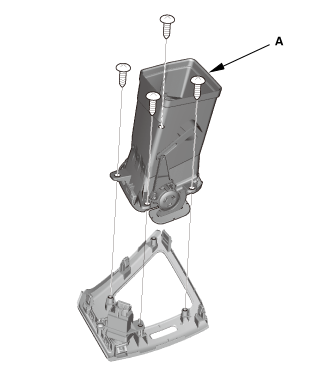
If necessary, remove the duct (A). |
|
- ECON Switch
 |
|
1. |
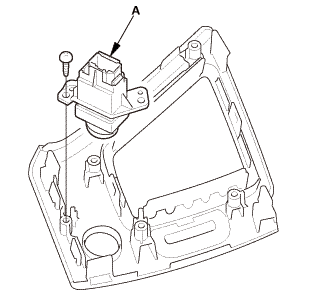
Remove the ECON switch (A). |
|
- ECON Switch Bulb
 |
|
1. |
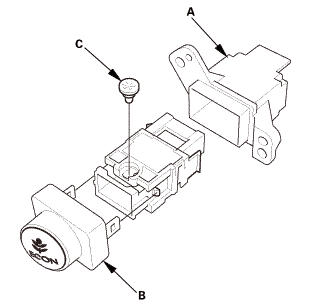
Remove the rear cover (A). |
|
2. |
Remove the front cover (B). |
|
3. |
Remove the ECON switch bulb (C). |
|

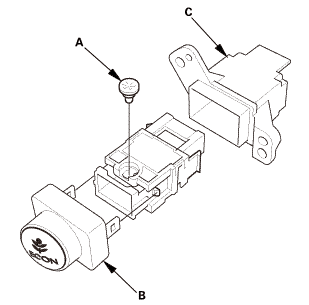
- ECON Switch Bulb
 |
|
1. |
Install the ECON switch bulb (A). |
|
2. |
Install the front cover (B). |
|
3. |
Install the rear cover (C). |
|
- ECON Switch
|
|
1. |
Install the ECON switch (A). |
|
- Driver's Outer Vent
|
|
2. |
Install the driver's outer vent (A). |
|
?
Test yourself
A quick Honda Civic quiz: every answer comes with an explanation and a link to the manual page.
Was this page helpful?