HandsFreeLink Control Unit Removal and Installation
In this manual: Accessories
~1min read
0521B3
Removal
NOTE:
SRS components are located in this area. Review the SRS component locations and the precautions and procedures before doing repairs or service.
Tell the customer they need to write down all phone numbers stored in the HFL and the navigation imported phone book as there is no way to transfer the information in the original HFL control unit to a new HFL control unit.
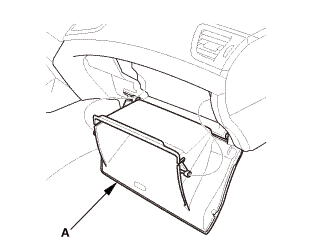
Glove Box - Move
1.
Lower the glove box (A).
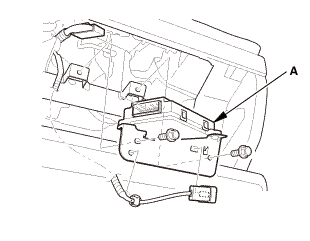
HFL Control Unit
1.
Disconnect the connector.
2.
Remove the HFL control unit (A).
Installation
NOTE: SRS components are located in this area. Review the SRS component locations and the precautions and procedures before doing repairs or service.
HFL Control Unit
1.
Connect the connector.
2.
Install the HFL control unit (A).
After replacing the HFL control unit, tell the customer:
They need to pair their phones to the system.
They need to set up their system preferences.
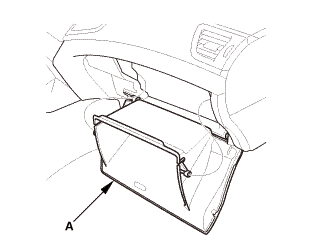
Glove Box - Move
1.
Install the glove box (A).
?
Test yourself
A quick Honda Civic quiz: every answer comes with an explanation and a link to the manual page.