Handling the Unexpected
If the Smart Entry Remote Battery is Weak
In this manual: Handling the Unexpected
2steps
~12min
1/5difficulty
Done 0 of 2
Models with smart entry system
If the beeper sounds, the To Start, Hold Remote Near Start Button message appears on the driver information interface, the ENGINE START/STOP button flashes, and the engine won't start. Start the engine as follows:

- Touch the center of the ENGINE START/ STOP button with the H logo on the smart entry remote while the ENGINE START/ STOP button is flashing. The buttons on the smart entry remote should be facing you.
► The button flashes for about 30 seconds.
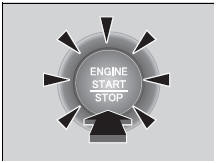
- Depress the brake pedal (continuously variable transmission) or clutch pedal (manual transmission) and press the ENGINE START/STOP button within 10 seconds after the beeper sounds and the ENGINE START/STOP button changes from flashing to on.
► If you don't depress the pedal, the mode will change to ACCESSORY.
Test yourself
A quick Honda Civic quiz: every answer comes with an explanation and a link to the manual page.
Was this page helpful?