Chassis
Parking Brake Adjustment (Drum Brake)

- Vehicle Lift
|
|
1. |
Raise the vehicle on a lift, and make sure it is securely supported. |
|
- Center Console Rear Trim
 |
|
1. |
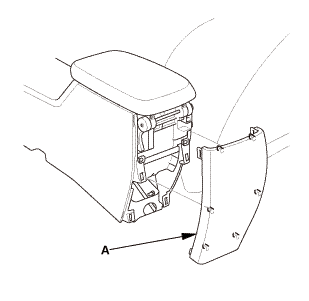
Remove the center console rear trim (A). |
|
- Parking Brake Adjusting Bolt - Loosen
 |
|
1. |
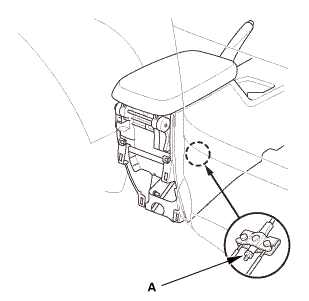
Release the parking brake lever fully. |
|
2. |
Loosen the adjusting nut (A). |
|

- Parking Brake - Adjustment (Drum Brake)
|
|
1. |
Loosen the adjusting nut (A). |
|
2. |
Press the brake pedal several times to set the self-adjusting brake before adjusting the parking brake. |
|
3. |
Pull the parking brake lever 1 click. |
|
4. |
Tighten the parking brake adjusting nut until the parking brakes drag slightly when the rear wheels are turned. |
|
5. |
Release the parking brake lever fully. |
|
6. |
Check that the parking brakes do not drag when the rear wheels are turned. |
|
7. |
Readjust if necessary. |
|
8. |
Make sure the parking brake lever is within the specified number of clicks (7 to 9 clicks). |
|

- Center Console Rear Trim
|
|
1. |
Install the center console rear trim (A). |
|
?
Test yourself
A quick Honda Civic quiz: every answer comes with an explanation and a link to the manual page.
Was this page helpful?