Resetting the Power Window Control Unit
 Procedure
- Power Window Control Unit - Reset
Resetting the power window is required when any of the following have occurred:
|
|||
|
|||
|
|||
|
|||
|

1. |
Turn the ignition switch to ON (II). |
2. |
Move the driver's window all the way down with the driver's window DOWN switch. |
3. |
Open the driver's door. |
|
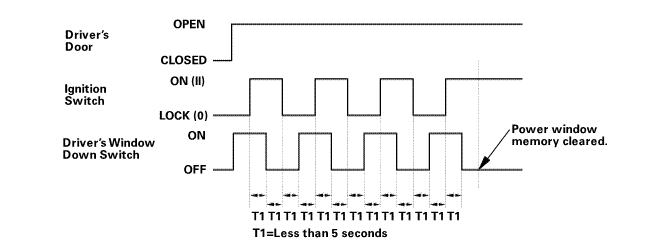
NOTE: Steps 4-7 must be done within 5 seconds of each other. |
||
4. |
Turn the ignition switch to LOCK (0). |
 armounupnwlrwindnwdawdawnswiich
5. |
Push and hold the driver's window DOWN switch. |
6. |
Turn the ignition switch to ON (II). |
7. |
Release the driver's window DOWN switch. |
8. |
Repeat step 4-7 three more times. |
9. |
Wait at least 1 second. |
10. |
Confirm that AUTO UP and AUTO DOWN do not work. If AUTO UP and DOWN work, go back to step 1. |
11. |
Move the driver's window all the way down with the driver's window DOWN switch. |
12. |
Pull up and hold the driver's window UP switch until the window reaches the fully closed position, then continue to hold the switch for at least 1 second. |
13. |
Confirm that the power window control unit is reset by using the driver's window AUTO UP and AUTO DOWN functions: |
|||||||||
|
||||||||||
Test yourself
A quick Honda Civic quiz: every answer comes with an explanation and a link to the manual page.