Chassis
VSA Off Switch Removal and Installation (K24Z7)

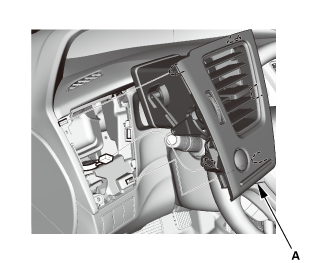
- Driver's Outer Vent (Except '12 models)
 |
|
1. |
Remove the driver's outer vent (A). |
|
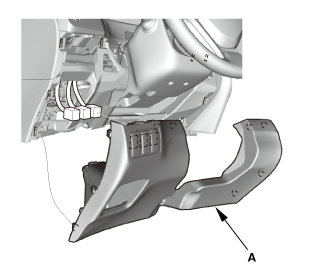
- Driver's Dashboard Lower Cover ('12 models)
 |
|
1. |
Remove the driver's dashboard lower cover (A). |
|
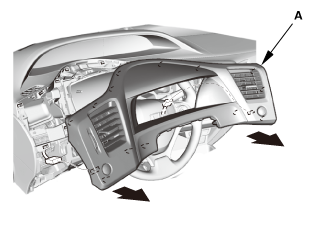
- Sub Display Visor Assembly ('12 models)
 |
|
1. |
Remove the subdisplay visor (A). |
|
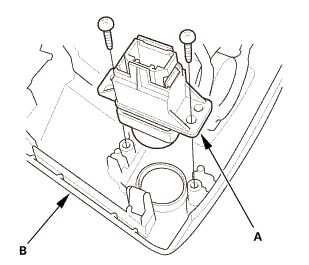
- VSA Off Switch (K24Z7)
 |
|
1. |
Remove the VSA OFF switch (A) from the subdisplay visor (B). |
|
- VSA Off Switch Bulb (K24Z7)
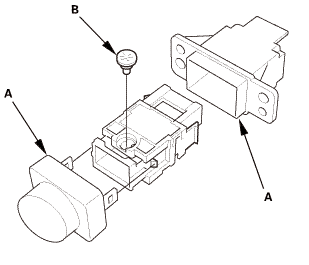 |
|
1. |
Remove the covers (A). |
|

- VSA Off Switch Bulb (K24Z7)
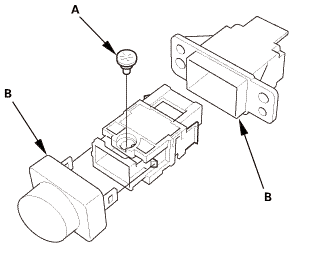 |
|
2. |
Install the covers (B). |
|
- VSA Off Switch (K24Z7)
|
|
1. |
Install the VSA OFF switch (A) to the subdisplay visor (B). |
|
- Sub Display Visor Assembly ('12 models)
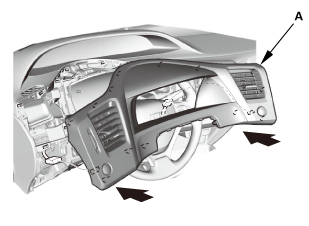 |
|
1. |
Install the subdisplay visor (A). |
|
- Driver's Dashboard Lower Cover ('12 models)
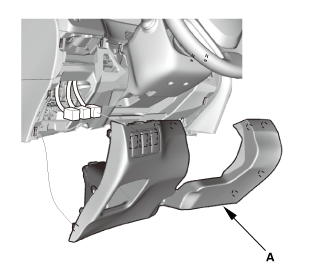 |
|
1. |
Install the driver's dashboard lower cover (A). |
|
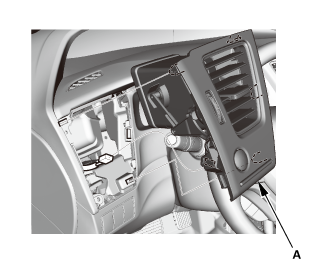
- Driver's Outer Vent (Except '12 models)
 |
|
1. |
Install the driver's outer vent (A). |
|
?
Test yourself
A quick Honda Civic quiz: every answer comes with an explanation and a link to the manual page.
Was this page helpful?