Second generation (2007-2026)
Resuming Your Trip
In this manual: Second generation (2007-2026)
~1min read
Stop your vehicle en route (e.g., to rest, stop for gas, etc.), and then continue on your route.
If you did not complete your route, the Continue Trip screen is displayed when you restart your vehicle.
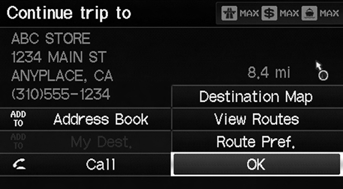
Select OK.
► You can continue on the same route.
• Route Pref.: Changes the route preferences (calculating method). • View Routes: Displays three different routes.• Destination Map: Display a map of the destination.
The Continue Trip screen has the same options as when you calculate a route.
To cancel your destination, press the CANCEL/ BACK button.
Add to Address BookYou can add the destination address to the address book.
CallYou can place a phone call to the destination phone number.
Test yourself
A quick Honda Fit quiz: every answer comes with an explanation and a link to the manual page.
Was this page helpful?