Setting the Clock
Press and hold the CLOCK (SOUND) button until you hear a beep. The displayed time begins to blink. Change the hours by pressing the H (preset 4) button until the numbers advance to the desired time.
Change the minutes by pressing the M (preset 5) button until the numbers advance to the desired time.
Press the CLOCK (SOUND) button again to enter the set time.
You can quickly set the time to the nearest hour. If the displayed time is before the half hour, press the CLOCK (SOUND) button until you hear a beep, then press the R (preset 6) button to set the clock back to the previous hour. If the displayed time is after the half hour, the clock sets forward to the beginning of the next hour.
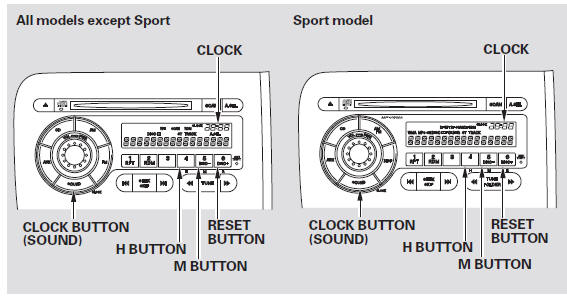
For example:
1:06 will reset to 1:00
1:53 will reset to 2:00
Test yourself
A quick Honda Fit quiz: every answer comes with an explanation and a link to the manual page.