Second generation (2007-2026)
Playing a USB Flash Drive
In this manual: Second generation (2007-2026)
~1min read
Your audio system reads and plays sound files on a USB flash drive in either MP3, WMA or AAC*1 format.
Connect your USB flash drive to the USB adapter cable, then press the AUX button.
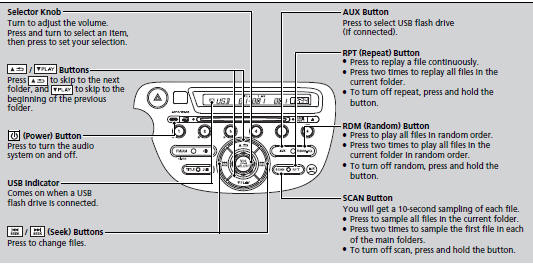
*1:Only AAC format files recorded with iTunes® are playable on this unit.
■How to Select a File from a Folder with the Selector Knob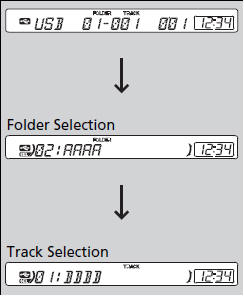
1. Press
 to switch the display
to a folder list. 2. Rotate
 to select a folder.
3. Press
 to change the display to a
list of files in that folder.
4. Rotate  to select a file, then
press  .
Use the recommended USB flash drives.
Files in WMA format protected by digital rights management (DRM) are not played.
The audio system displays UNPLAYABLE FILE, and then skips to the next file.
If there is a problem, you may see an error message on the audio display.
Test yourself
A quick Honda Fit quiz: every answer comes with an explanation and a link to the manual page.
Was this page helpful?