Audio Remote Controls
Allows you to operate the audio system while driving.
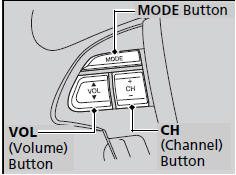
MODE Button Cycles through the audio modes as follows:
FM1→FM2→AM→XM1*→XM2*→CD→CD -L→AUX
VOL Button Press  : Increases the volume.
Press  : Decreases the volume.
CH Button • When listening to the radio Press  : Selects the next preset radio station. Press
 : Selects the previous preset radio station. Press and hold
 : Selects the next strong station. Press and hold
 : Selects the previous strong station. • When listening to a CD, CD Library, iPod® or USB flash drive. Press
 : Skips to the next song. Press
 : Goes back to the beginning of the current or previous song. • When listening to a CD or CD Library. Press and hold
 : Skips to the next folder/album. Press and hold
 : Goes back to the previous folder/album.
The CD mode appears only when a CD is loaded.
When in the AUX mode, the following are operable from the remote controls:
• iPod®/USB flash drive connected to the USB adapter cable
• Bluetooth® Audio (with some phones only)