Multimedia System
NOTICE
- If you install an aftermarket HID headlamp, the audio system and electronic devices in your vehicle may malfunction.
- Prevent chemicals such as perfume, cosmetic oil, sunscreen, hand cleaner, and air freshener from contacting interior parts, as they may cause damage or discoloration.
AUX, USB and iPod® Port
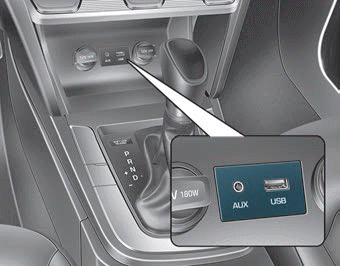
You can use the AUX port or USB cable to connect audio devices to the vehicle.
Information
When using a portable audio device connected to a power outlet, noise may occur during playback. In this case, use the power supply of the portable audio device.
Antenna
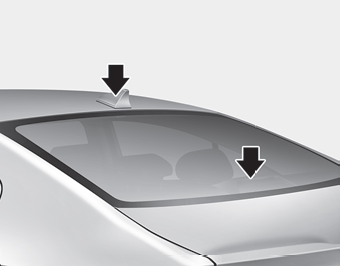
Shark Fin Antenna (if equipped)
The shark fin antenna receives transmitted data (for example, XM signal).
Glass Antenna
Your vehicle uses a glass antenna to receive AM and FM signals.
NOTICE
- To avoid damaging the rear glass antenna, never use sharp objects or window cleaner containing abrasives. Clean the inner surface of the rear window with a soft cloth.
- Avoid applying metallic coatings to the rear window. They may degrade AM and FM broadcast signals.
Steering Wheel Audio Controls
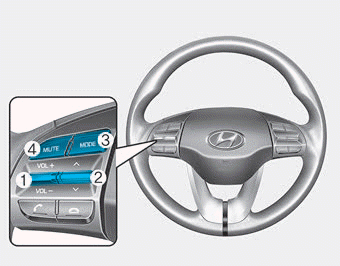
■ Type A
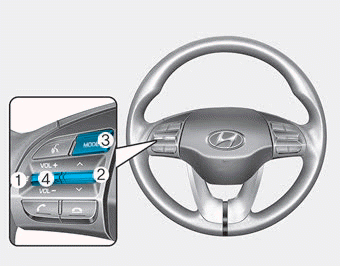
■ Type B
NOTICE
Do not press multiple buttons on the remote control at the same time.
VOLUME (VOL +/-) (1)
- Press the VOLUME switch up to increase the volume.
- Press the VOLUME switch down to decrease the volume.
SEEK/PRESET ( ) (2)
If the SEEK/PRESET switch is pressed up or down and held for 0.8 seconds or more, it will operate as follows:
RADIO mode
It will function as the AUTO SEEK selection button. It will search until you release the button.
MEDIA mode
It will function as the FF/RW button.
If the SEEK/PRESET switch is pressed up or down, it will operate in the following modes:
RADIO mode
It will function as the PRESET STATION UP/DOWN button.
MEDIA mode
It will function as the TRACK UP/DOWN button.
MODE (3)
Press the MODE button to switch between Radio, XM, or AUX modes.
MUTE ( ) (4)
• Press the MUTE button to mute the sound. • Press the MUTE button again to restore the sound.
Information
Detailed information on audio control buttons is described later in this chapter or in the Multimedia System Owner's Manual supplied with this vehicle.
Bluetooth® Wireless Technology Hands-Free
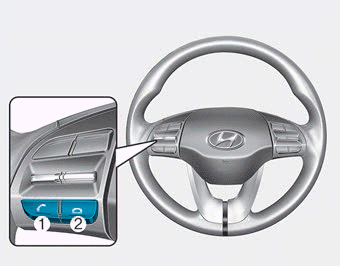
■ Type A
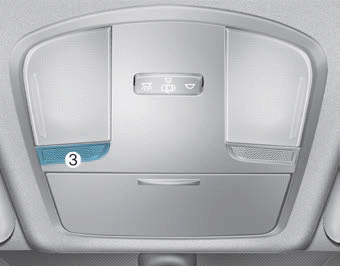
■ Type B
You can use your phone wirelessly with Bluetooth® Wireless Technology.
(1) Call/Answer button
(2) End call button
(3) Microphone
Detailed information on Bluetooth® Wireless Technology hands-free is described later in this chapter or in the Multimedia System Owner's Manual.
Test yourself
A quick Hyundai Elantra AD quiz: every answer comes with an explanation and a link to the manual page.