Automatic climate control system
The sophisticated automatic climate control system intelligently cools or heats the cabin interior of your Kia EV2 to maintain customized thermal comfort for both the driver and all passengers.
 |
|
 |
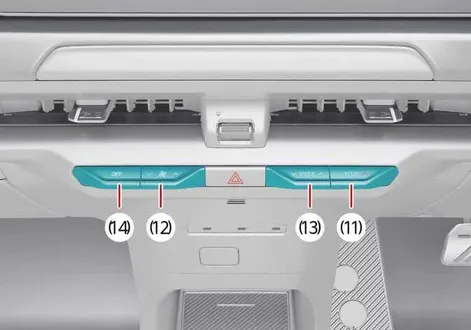 |
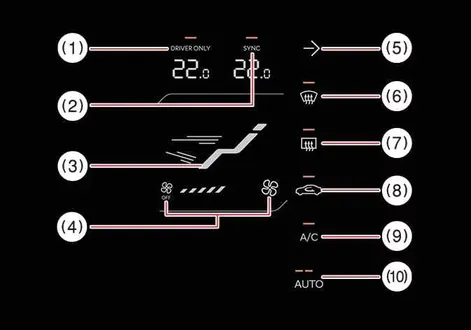
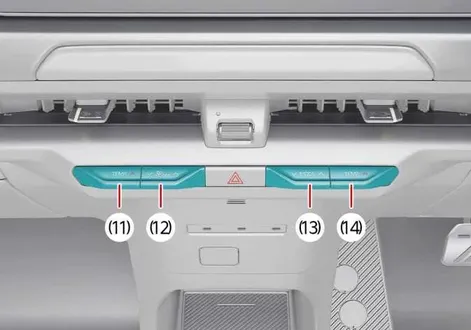
Review the interface mapping index below to identify each dashboard control function:
DRIVER ONLY select icon for targeted single-zone airflow concentration
SYNC icon: (if equipped)
Touch the SYNC icon to instantly link and match the driver and passenger side temperatures to the exact same value.
Mode selection icon for directing airflow patterns
Fan speed control and system OFF icon
Infotainment system screen ON/OFF power control icon
Front-windscreen defroster icon for rapid clearing
Rear-window defroster and heated glass icon
Air intake control icon for switching between fresh and recirculated modes
Air conditioning A/C compressor activation icon
AUTO (automatic climate regulation) icon
Driver's side temperature control rotary dial or touch lever
Fan speed control lever or slider
Fan speed control and system OFF lever: (if equipped)
Mode selection lever or toggle switch
System OFF power lever
Passenger's side temperature control lever: (if equipped)
Operating the high-draw blower fan extensively while the vehicle is stationary in the POWER ON position can cause the 12V auxiliary battery to discharge. To preserve battery charge, run the climate blower fan primarily when the vehicle system is fully active and ready for driving.