Smart regeneration system settings
 |
|
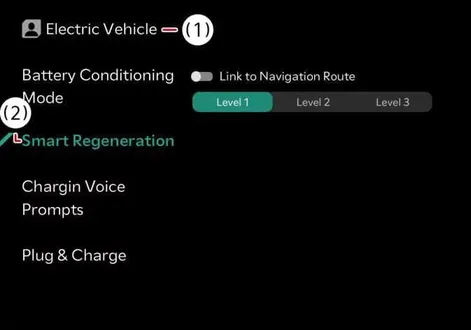
Tap Electric Vehicle >
 > Smart Regeneration > Link to Navigation Route from the infotainment system to configure your preferences.
Smart Regenerative Braking Distance level allows you to adjust the distance to the vehicle ahead according to the driver's distance level (Level 1/Level 2/Level 3) for customized driving dynamics.
Navigation-based speed control
In the (
 ) stage, the speed is automatically adjusted using real-time navigation information.
Navigation-based speed control provides more accurate information when a destination is set. If a destination is not set, some functions may not work.
The automatic deceleration function operates in the following situations:
When turning left/right at an intersection, it decelerates to an appropriate speed.
It decelerates to an appropriate speed on sharp curves.
When the speed limit on a road is lowered (90-50 km/h (56-30 mph), etc.), it decelerates to the speed limit once.
The automatic deceleration function for changes in road speed limits only operate in Europe.
It automatically decelerates to an appropriate speed just before entering a roundabout.