Driving your vehicle
Drive mode integrated control system
In this manual: Driving your vehicle
~1min read
DRIVE MODE
Selecting DRIVE MODE
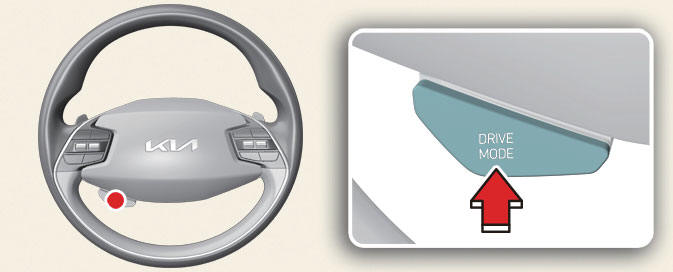
Operation
- Press the DRIVE MODE button.
- Press and hold DRIVE MODE button to change to SNOW mode.
- DRIVE MODE will change to NORMAL mode when the vehicle is restarted. ECO mode will be maintained when the vehicle is restarted.
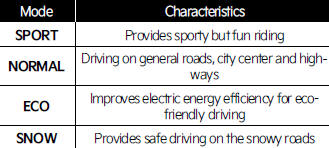
DRIVE MODE characteristics- (Kia Niro EV)
DRIVE MODE button
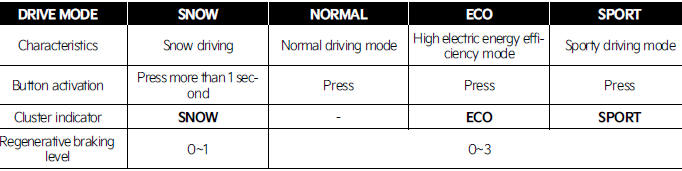
Infotainment system

NOTICE
- If there is a problem with the instrument cluster, the drive mode will be in NORMAL mode and may not change to ECO mode or SPORT mode.
- Efficiency depends on the driver's driving habit and road condition.
- In SPORT mode, the electric energy efficiency may decrease.
- When you mildly drive the vehicle in NORMAL mode, the driving mode changes to ECO mode to improve electric energy efficiency. However, the actual efficiency may differ in accordance with your driving situations.
INFORMATION
It is possible to set the climate system control and brake mode separately.
Select Settings → Vehicle → Drive mode → Brake mode or ECO mode climate control from the infotainment system.
For more information, refer to the manual provided in the infotainment system and the quick reference guide.
Was this page helpful?