Power Window Switch Repair procedures
Inspection
[Non-IMS Type]
Driver Power Window Switch
Disconnect the negative (-) battery terminal.
Remove the driver front door trim.
(Refer to Body - "Front Door Trim")
Disconnect the power window switch connector from the door trim.
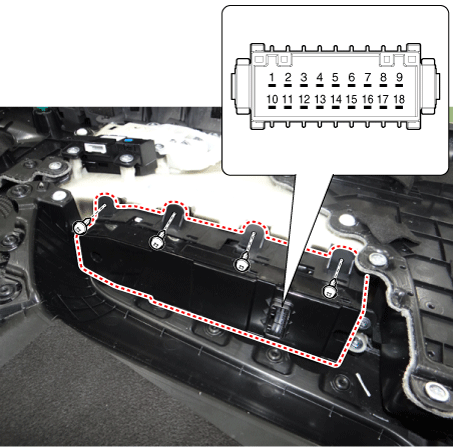
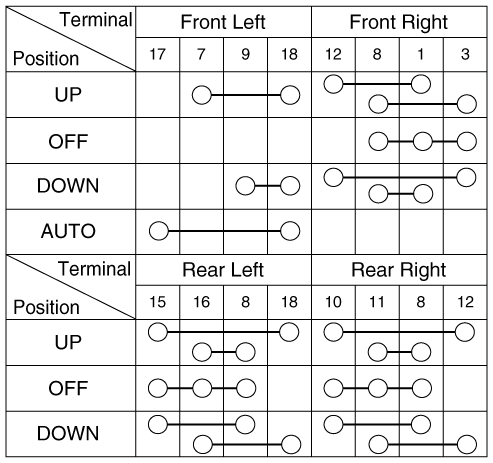
Check for continuity between the terminals in each switch position as shown below.
[Power Window Switch Inspection]
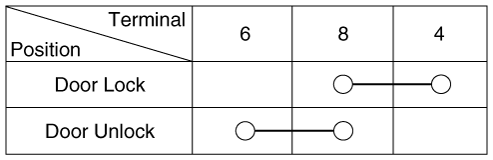
[Power Door Lock Switch Inspection]
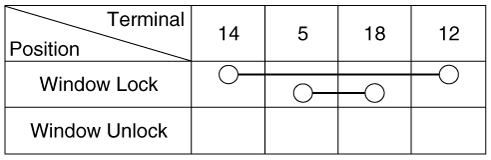
[Power Window Lock Switch Inspection]
Assist Power Window Switch
Disconnect the negative (-) battery terminal.
Remove the assist front door trim.
(Refer to Body - "Front Door Trim")
Disconnect the power window switch connector from the door trim.
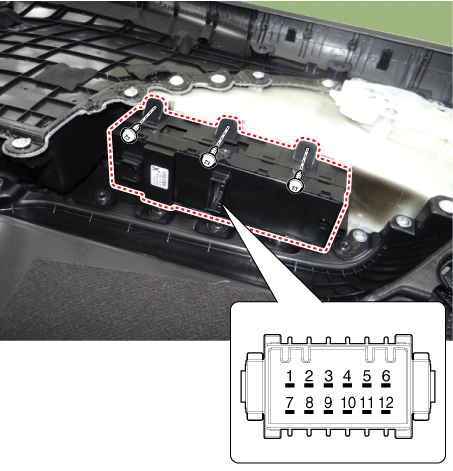
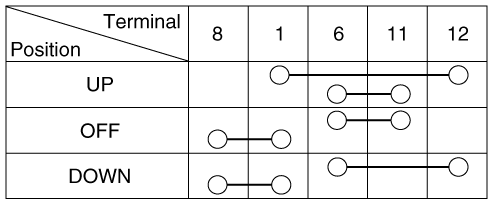
Check for continuity between the terminals in each switch position as shown below.
[Power Window Switch Inspection]
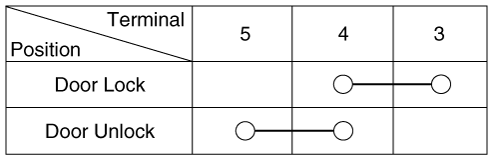
[Power Door Lock Switch Inspection]
Rear Power Window Switch
Disconnect the negative (-) battery terminal.
Remove the rear door trim.
(Refer to Body - "Rear Door Trim")
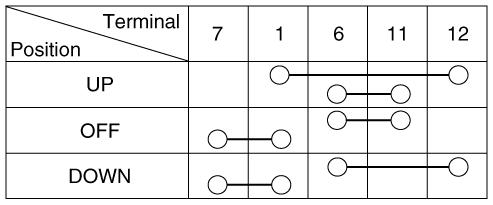
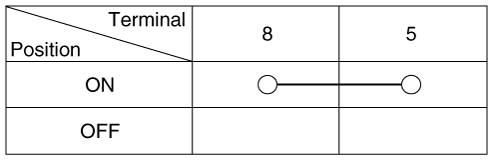
Disconnect the power window switch connector from the door trim.
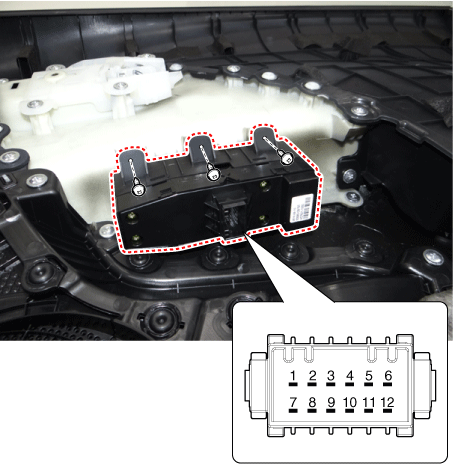
[Power Window Switch Inspection]
[Rear Seat Heater Switch Inspection]
[IMS Type]
Diagnosis With KDS/GDS
The body electrical system can be quickly diagnosed for failed parts by using vehicle diagnostic system (KDS/GDS).
The diagnostic system (KDS/GDS) provides the following information.
Self diagnosis : Checks and displays the failure code (DTC)
Current data : Checks the system input/output data state
Actuation test : Checks the system operating condition
Additional function : Other controls such as the system option and zero point
Select the 'Car model' and the system to be checked in order to check the vehicle with the tester.
Select the 'Body Control Module (BCM)' to check the driver seat or assist door module (DDM/ADM).
Select the "Current Data" menu to check the current state of the input/output data.
The input/output data for the sensors corresponding to the driver seat or assist door module (DDM/ADM) can be checked.
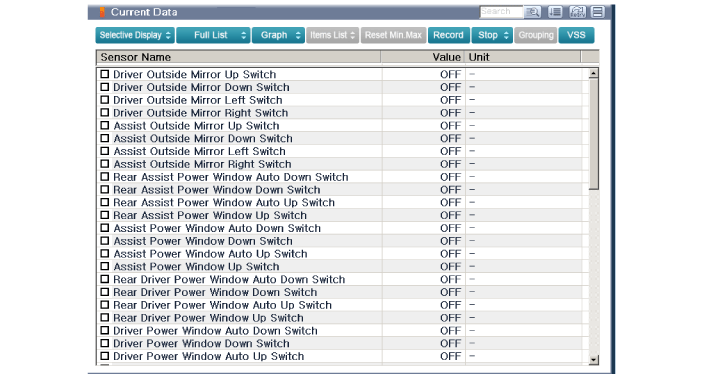
To check the power door lock operation by force, select "Actuation test".
Removal
Driver Power Window Switch
Disconnect the negative (-) battery terminal.
Remove the driver front door trim.
(Refer to Body - "Front Door Trim")
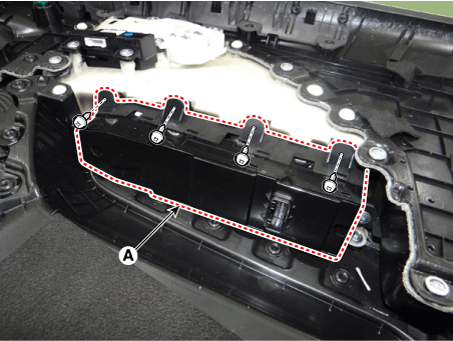
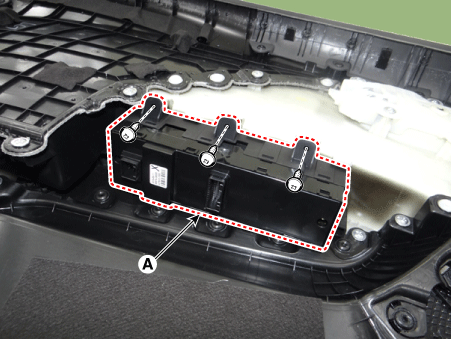
Remove the power window switch assembly (A) after loosening the mounting screws.
Assist Power Window Switch
Disconnect the negative (-) battery terminal.
Remove the assist front door trim.
(Refer to Body - "Front Door Trim")
Remove the power window switch assembly (A) after loosening the mounting screws.
Rear Power Window Switch
Disconnect the negative (-) battery terminal.
Remove the rear door trim.
(Refer to Body - "Rear Door Trim")
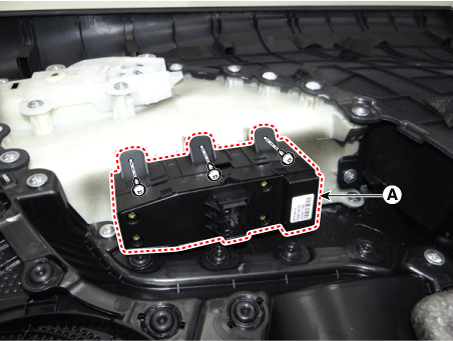
Remove the power window switch assembly (A) after loosening the mounting screws.
Installation
Driver Power Window Switch
Install the power window switch assembly.
Install the driver front door trim after connecting the connector.
Connect the negative (-) battery terminal.
Assist Power Window Switch
Install the power window switch assembly.
Install the assist front door trim after connecting the connector.
Connect the negative (-) battery terminal.
Rear Power Window Switch
Install the power window switch assembly.
Install the rear door trim after connecting the connector.
Connect the negative (-) battery terminal.