Driving your vehicle
To set cruise control speed
In this manual: Driving your vehicle
~1min read
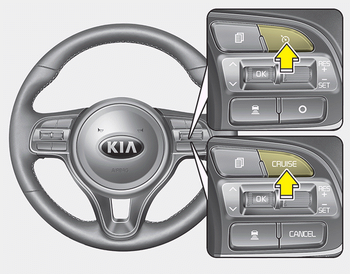
1. Press the CRUISE button, to turn the system on. The CRUISE indicator in the instrument cluster will illuminate.
2. Accelerate to the desired speed. The smart cruise control speed can be set as follows:
- 30 km/h ~ 180 km/h: when there is no vehicle in front
- 10 km/h ~ 180 km/h: when there is a vehicle in front

3. Move the lever down (to SET-), and release it at the desired speed. The set speed and vehicle to vehicle distance on the LCD screen will illuminate.
4. Release the accelerator pedal. The desired speed will automatically be maintained.
If there is a vehicle in front of you, the speed may decrease to maintain the distance to the vehicle ahead.
On a steep grade, the vehicle may slow down or speed up slightly while going uphill or downhill.
Was this page helpful?