Features of your vehicle
Trip A/B
In this manual: Features of your vehicle
~1min read
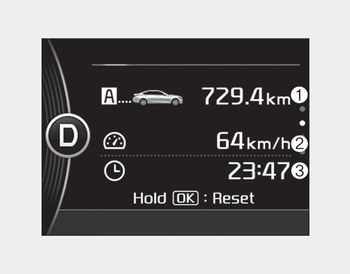
Tripmeter (1)
- The tripmeter is the total driving distance since the last tripmeter reset.
- Distance range: 0.0 ~ 9999.9 km or mi. - To reset the tripmeter, press the OK button (reset) on the steering wheel for more than 1 second when the tripmeter is displayed.
Average Vehicle Speed (2)
- The average vehicle speed is calculated by the total driving distance and driving time since the last average vehicle speed reset.
- Speed range: 0 ~ 999 km/h or MPH - To reset the average vehicle speed, press the OK button (reset) on the steering wheel for more than 1 second when the average vehicle speed is displayed.
✽ NOTICE
- The average vehicle speed is not displayed if the driving distance has been less than 50 meters (0.03 miles) or the driving time has been less than 10 seconds since the ignition switch or Engine Start/Stop button was turned to ON.
- Even if the vehicle is not in motion, the average vehicle speed keeps going while the engine is running.
Elapsed Time (3)
- The elapsed time is the total driving time since the last elapsed time reset. - Time range (hh:mm): 00:00 ~ 99:59
- To reset the elapsed time, press the OK button (reset) on the steering wheel for more than 1 second when the elapsed time is displayed.
✽ NOTICE
Even if the vehicle is not in motion, the elapsed time keeps going while the engine is running.
Was this page helpful?