Intuitive parking assist
The distance from your vehicle to nearby obstacles when parallel parking or maneuvering into a garage is measured by the sensors and communicated via the multi-information display and a buzzer. Always check the surrounding area when using this system.
Vehicles with a navigation system
Refer to the “Navigation System Owner’s Manual”.
Vehicles without a navigation system
Types of sensors
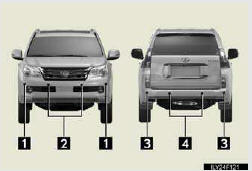
1. Front corner sensors
2. Front center sensors
3. Rear corner sensors
4. Rear center sensors
Intuitive parking assist switch
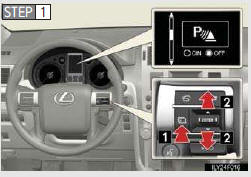
1. Press the menu switch.
The multi-information display will change modes to elec- tronic features control mode.
2. Press the “ENTER” switch upwards or downwards until the Intuitive parking assist mark appears in the multi- information display.
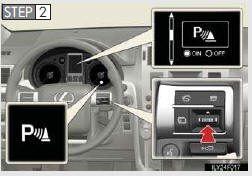
Press the “ENTER” switch to change to “ON”.
The Intuitive parking assist indi- cator will be displayed.
Each pressing of the switch turns the Intuitive parking assist on and off.
When on, the buzzer sounds to inform the driver that the system is operational.
Press the menu switch to change to the normal display.
Test yourself
A quick Lexus GX quiz: every answer comes with an explanation and a link to the manual page.